
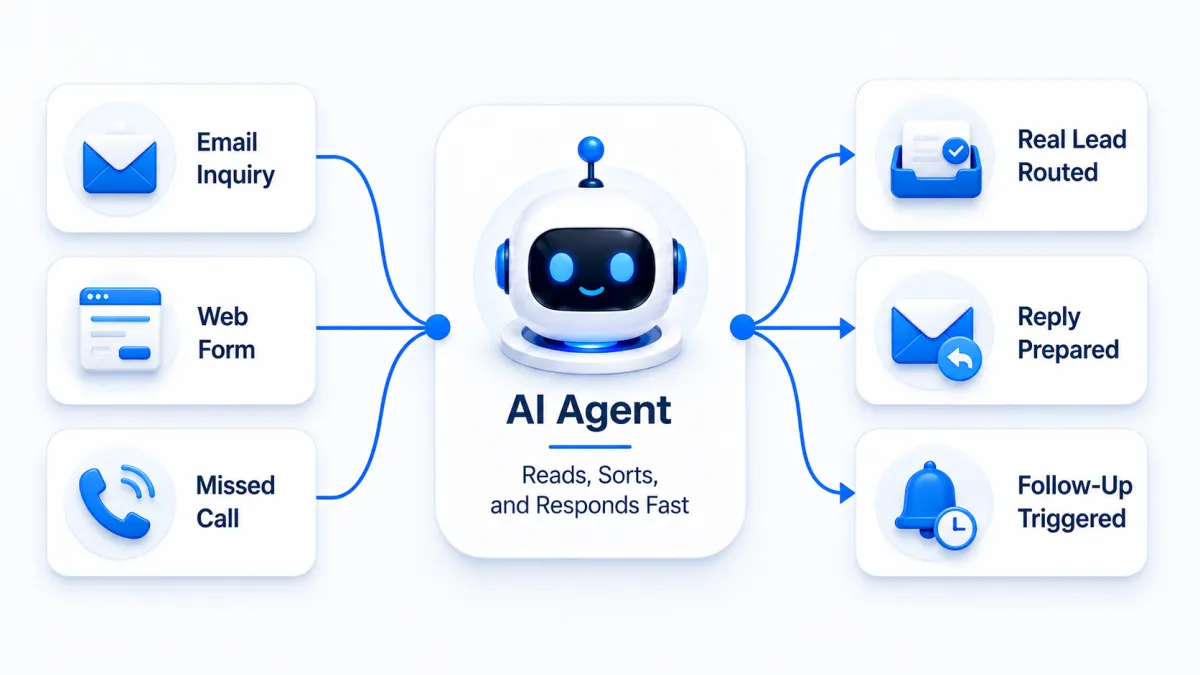
AI Agent Lead Qualification Workflow (Email Reply Automation)
Leads don’t usually disappear in a dramatic way. Most of the time, they fade out quietly.
A person fills out a form. You see it later. You mean to reply. Then the day moves on. Another person calls while you’re busy. You miss it. They don’t leave a voicemail. You never hear from them again.
That’s not a “you problem.” That’s a workflow problem.
This post is about a simple idea: when you can’t respond to every lead right away, you need a system that can. That’s where lead generation automation and AI agents can help by keeping your replies fast, your follow-up consistent, and your leads from slipping through the cracks.
What This Post Covers
Why leads get missed (even by great businesses)
How AI agents help with first replies, routing, and consistency
A practical lead workflow for email, forms, and phone calls
Where missed call text back fits in
What “custom” should mean when you set this up
The Quiet Ways Leads Get Lost
Most businesses don’t ignore leads on purpose. Leads get missed because work gets loud.
Your day is full of real things:
a job that runs long
a customer who needs help now
a staff question that turns into an hour
a phone that keeps ringing
an inbox that fills up with everything except the lead you needed to see
And modern leads don’t come from one place. They come from email, forms, calls, and messages. If your lead handling depends on “someone noticing,” your system will break on busy days.
The fix isn’t “try harder.” It’s to build a process that still works when you’re not available.
Why Fast Replies Matter (Without the Hype)
When someone reaches out, they’re giving you a small window of attention. They are still thinking about their problem. They’re still looking at options. They may still be on your website or profile.
A fast reply doesn’t need to be perfect. It just needs to do one thing well:
Make the person feel seen and guide them to the next step.
That’s what people remember. Not the clever wording. Not the long message. The feeling that someone is there.
This is where lead response automation earns its keep. It helps you respond quickly and consistently, even when you’re busy.
What AI Agents Actually Do for Lead Handling
AI agents work best when they handle the repeatable parts of lead response, the parts that slow you down or get skipped when you’re slammed.
In simple terms, an AI agent can help by:
reading the newest message
summarizing what the person wants
sending a short first reply in your tone
asking one helpful question if the lead was vague
routing the message to the right place
flagging messages that need a human now
This isn’t about pretending a computer is a person. It’s about reducing “dead air.” It’s about keeping momentum.
Think of it like a front desk assistant that doesn’t take breaks.
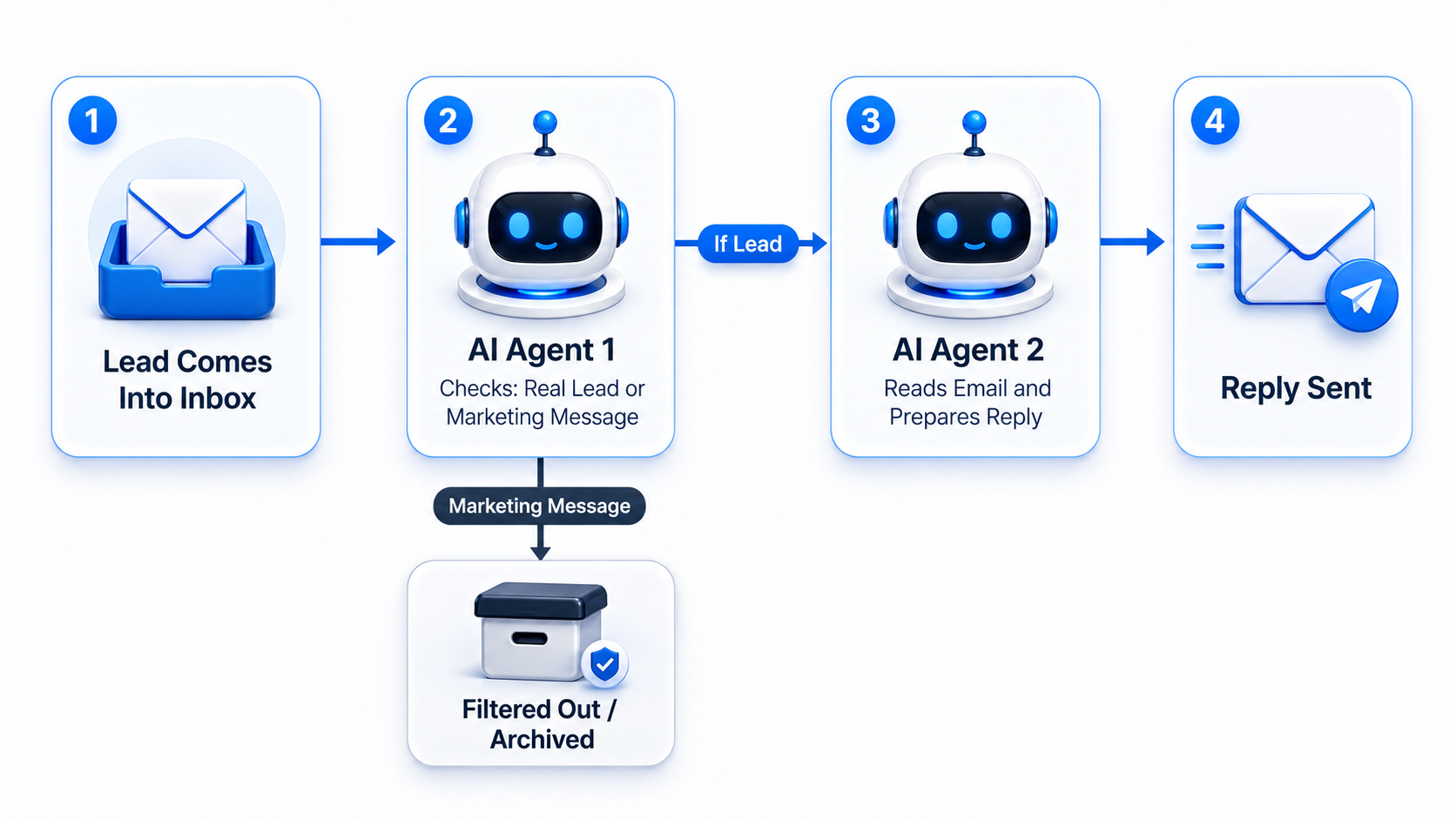
A Professional Lead Workflow That’s Easy to Run
A reliable workflow is not complicated. It’s clear. It’s consistent. It’s built around the same goal every time:
Respond fast. Clarify what they need. Route it. Follow through.
Here’s a clean structure you can adapt for almost any business.
1) Capture the Lead Wherever They Reach You
Leads can show up through:
web forms
email
phone calls
Google Business messages
social DMs
ads
2) Send an Instant First Reply
Frequently Asked Questions
If your system only handles one channel well, the others become a leak.
A good automated lead management setup routes incoming leads into one place (or one process). That way your business isn’t guessing where to look today.
This is your instant lead response. It doesn’t need to solve everything. It needs to start the conversation.
A strong first reply is short and clear:
confirms you got the message
sets expectations
asks one simple question or offers one simple option
Example style (generic, not scripted):
“Thanks for reaching out. What do you need help with, and what’s the best way to reach you, call, text, or email?”
That’s it. Simple. Human. Useful.
3) Route the Lead to the Right Person (or the Right Next Step)
Routing is where many businesses fall apart.
If every lead lands in the same inbox, your best leads get buried with the rest. If nobody owns the lead, nobody answers.
Routing can be simple:
Sales questions go to one inbox
Support questions go to another
Urgent requests get flagged
Wrong-fit requests get a polite close
This is also where AI agents help. They can classify the request and route it without you reading every message first.
4) Follow Up When the Lead Goes Quiet
Here’s the truth: many leads don’t reply the first time. Not because they don’t care. Because life happens.
A basic follow-up plan helps keep the conversation alive. You don’t need ten messages. You need a few thoughtful touches that stay respectful.
A light follow-up approach might look like:
a short check-in later the same day
another short check-in the next day
then stop, or move the lead into a lower-priority nurture list
The key is consistency. A system that follows up sometimes is almost worse than none, because it creates random results.
Email Leads: Where Good Requests Get Buried
Email is still one of the most common lead channels, and it’s also where leads disappear.
Not because you don’t want to reply-because email mixes everything:
real leads
vendor pitches
spam
receipts
alerts
newsletters
AI agents help here in a practical way:
they can identify a real inquiry
pull out the main question
draft a short reply
tag the thread as “Needs Reply”
keep it from sinking under everything else
This is especially useful if you’ve ever said, “I never even saw that email.”
Web Forms: The Lead Comes In, Then… Nothing
Many websites do a good job collecting leads and a poor job guiding them.
A form submits, and the person gets a generic “Thanks.” Then they wait.
A better setup treats a form as the start of a conversation:
The lead gets an instant reply that says what happens next
The system asks one clarifying question if needed
The lead gets routed to the right person
If your form is too vague, your reply becomes slow because you need to ask for basics.
A small improvement that often helps:
add “Best way to contact you”
add “What do you need help with”
add “How soon do you need a response”
Not to make the form long-just to make your first reply easier and faster.
Phone Calls: The Lead Leak Most Businesses Underestimate
Missed calls are normal. Nobody answers every time.
The problem is what happens after the missed call.
If the caller hears nothing, many won’t call back. They’ll move on, especially when they’re stressed or in a hurry.
This is where missed call text back helps.
A missed call text back is simple: when a call is missed, a text goes out automatically. It keeps the conversation alive without you touching your phone.
A good missed-call text is short:
quick acknowledgment
one question or one next step
a clear way to reply
Example style:
“Sorry we missed your call. What do you need help with? Reply here and we’ll follow up.”
It doesn’t promise anything. It doesn’t overshare. It just opens the door again.
“Custom” Should Mean the Workflow Fits Your Business
A lot of systems claim they’re “custom,” but the changes are surface-level. You can change colors, tweak a message, maybe adjust one step.
Real customization matters because every business runs differently.
A truly custom lead workflow lets you control:
which leads get flagged as urgent
who gets notified
what happens after hours
what questions get asked first
when follow-ups should stop
how to handle “not a fit” requests
what happens when someone replies with a question
This is the difference between “we installed a tool” and “we built a process.”
And a process is what keeps leads from slipping away.
A Simple Reality Check You Can Do Today
If you want to know whether leads are falling through the cracks, you don’t need a big audit.
Do this:
Send a test form submission. See what happens.
Send a test email. See how long it sits.
Call your business and don’t answer. See if anything follows up.
Look back one week in your inbox. Find messages that never got a reply.
Frequently Asked Questions
What is lead generation automation?
Lead generation automation is a set of workflows that helps capture leads, respond faster, route messages, and follow up consistently so leads don’t get missed.
What is an AI agent in lead handling?
An AI agent is software that can help read messages, draft replies, ask basic questions, route requests, and keep lead handling consistent, especially when you’re busy.
What is lead response automation?
Lead response automation is the part of your system that sends a fast first reply and guides the lead to a next step, even if no one is available right away.
What is missed call text back?
Missed call text back is an automatic text message sent after a missed call, so the caller has a clear way to continue the conversation.
What makes a lead workflow truly custom?
A truly custom workflow lets you control routing, timing, tone, after-hours rules, follow-up rules, and handoff rules so the system matches how your business actually runs.
Express Media Solutions LLC is a website design, marketing, and SEO agency that helps businesses improve local visibility and turn leads into booked appointments with fast follow-up and booking automation.